Surfe Alternatives
8 Surfe alternatives compared: Pricing, features, and reviews
Looking for a Surfe alternative? We reviewed 8 tools that offer contact data, better CRM sync, and smarter automation for growing sales teams.
Surfe Alternatives

Surfe has become a go-to Chrome extension for revenue teams that live in LinkedIn. It helps sales reps capture contacts, enrich data, and sync conversations directly into CRMs like HubSpot or Salesforce.
But as teams scale or need more flexibility, Surfe’s model starts to feel limiting. Pricing rises quickly with added users, and enrichment credits run out fast. While Surfe supports native and API-based enrichment, its workflows are primarily built around LinkedIn activity—which doesn’t work for all teams.
That’s why we’ve analyzed the best Surfe alternatives that deliver similar or stronger capabilities in data accuracy, enrichment, automation, and CRM integration. We evaluated each tool based on verified user feedback, real-world pros and cons, pricing transparency, compliance, and workflow fit to help you find the right fit for your sales stack.
Why choose a Surfe alternative
Sales teams love Surfe for how seamlessly its Chrome extension connects LinkedIn Sales Navigator with their CRM. It’s fast, intuitive, and helps extract verified contact data and lead details without leaving a profile.
But as teams scale, many find that Surfe’s pricing, automation, and enrichment features don’t always match the depth or flexibility they need across large, multi-channel sales operations.
1. Pricing and scalability limits for growing teams
Surfe offers three main plans, Free, Essential, and Pro, all tied to individual users. Each tier includes limited monthly credits for finding contact details:
- Free plan: Includes 20 email credits and 5 phone credits per month, with 1-click Add to CRM, limited messaging templates, and basic access to company and people search
- Essential plan ($49 per user/month): Offers 150 email and 50 phone credits, unlimited email validation, and integrations with Salesloft, Outreach, and Lemlist
- Pro plan ($89 per user/month): Aimed at global teams prospecting at scale, this plan provides 1,000 email and 100 phone credits monthly, deeper search capabilities (up to 10,000 results per day), Prospect List Builder, and “Account Lookalikes” for advanced lead data discovery.
This seat-based model creates a few deeper problems:
- Credits are tied to individual accounts instead of shared usage, so teams can’t pool or reallocate them across users
- Because enrichment happens through personal Chrome extensions, there’s no easy way to manage or audit enrichment volume across the organization
- Even with CRM integration, Surfe’s automation mostly stops at syncing contact data or exporting leads. There’s no built-in orchestration to trigger actions across multichannel outreach tools or update CRM workflows automatically
For many teams, the challenge is how pricing scales. Paying per seat or per month can become inefficient for large teams or fluctuating workloads. That’s why some users prefer outcome-based pricing models that charge only for the records enriched or verified, making costs directly tied to usage and ROI.
“The only notable drawback for me is the pricing structure… it feels like the pricing could be more flexible or tiered to accommodate different scales of operations.” — Jos B., Outsourcing Specialist
2. Limited control and costly enrichment model
Many reviewers agree that Surfe’s data accuracy and verified emails are solid, but the way enrichment works leaves little flexibility for sales teams managing complex data flows.
“Currently, you are unable to choose not to enrich the email address. We have mostly inbound leads so we have already captured that and would like to focus on the phone numbers.” — Fi V., GTM Engineer
“The email credits remain my main frustration… I know I’ll quickly use up the 1,800 credits I receive annually, which will likely force me to upgrade.” — Todd S., Director of Global Sales and Partnerships
Each enrichment credit is consumed automatically, even when the field already exists in the CRM. That makes it difficult to prioritize contact info, such as phone numbers or decision-maker data, without wasting credits. It also limits how teams can layer intent signals, prospect data, and job changes into ongoing CRM updates or sales engagement platforms.
3. Too dependent on LinkedIn workflows
Surfe’s strength and its biggest limitation are how tightly it’s built around LinkedIn workflows. The Chrome extension makes prospecting on LinkedIn Sales Navigator incredibly smooth, but that convenience comes at the cost of flexibility.
Surfe is great when reps are working one-to-one from LinkedIn profiles, adding contacts and syncing data directly into the CRM. But when enrichment needs to happen at scale through bulk imports, automated sequences, or multichannel outreach the browser becomes a bottleneck. While it’s possible, teams can’t easily enrich prospect lists, run Sales Navigator searches, or connect outreach tools like Salesloft or Lemlist without toggling between multiple platforms or manually triggering the extension.
4. Shallow automation and workflow logic
Even power users say they still rely on external automation tools to close the loop after enrichment. Surfe gets data into the CRM, but lacks the complex automation workflows that help route, trigger, or act on it.
“I’d like to see more automation options baked in, so I don’t always have to rely on external tools like Relay.app to complete the loop.” — Sean S., Principal Consultant
Without built-in routing or triggers, RevOps teams can’t connect enrichment to sales engagement platforms or intent-based workflows. Surfe improves data hygiene but leaves activation fragmented, forcing teams to bridge gaps between data enrichment, prospect data, and outreach tools manually.
That’s why many switch to Surfe alternatives that deliver CRM-native automation, automatically scoring, routing, and syncing new leads across channels.
5. Narrow or inconsistent dataset filters
Surfe delivers strong data enrichment, but users say its filters can feel limited when refining lead lists or prospect data.
“Some filters, like department and technology, can feel limited or inconsistent depending on the dataset. Occasionally, I need to manually clean titles or remove irrelevant roles that slip through.” — Sean S., Principal Consultant
That means extra data cleaning and manual review to ensure contact details align with the right ICP. Inconsistent search results also make it harder for sales teams to segment accounts or qualify leads accurately.
For RevOps and operations teams, it’s a reminder that CRM data is only as precise as the filters powering it, leading many to explore Surfe alternatives that unify multiple data sources and apply filtering logic before syncing to the CRM.
We’ve seen where Surfe falls short: limited flexibility, credit fatigue, and browser-based limits. Now, let’s look at the best Surfe alternatives that fix those pain points with smart CRM-native enrichment and automation built for real-world teams.
8 Surfe alternatives: Quick overview

Lonescale
- Daily refresh with additional 7-day and 30-day refresh options
- 99% overall data accuracy with 94% verified mobile phone and email coverage
- 25+ contact- and account-level data points
- Native integrations with Salesforce, HubSpot, OpenAI, and Lemlist for automated CRM enrichment and workflows
- GDPR and CCPA compliant, with SOC II certification and encrypted SSL data transmission


LeadCRM
- Real-time sync from LinkedIn
95%+ verified contact accuracy - Core data: emails, phones, company details
- HubSpot, Salesforce, Pipedrive, Zoho, Copper, Google Sheets
- GDPR-compliant, encrypted sync


ZoomInfo
- Data freshness not disclosed publicly
- Data accuracy not verified
- Firmographic, technographic, decision-maker contacts, org charts, mobile numbers, and intent/buying signals
- Salesforce, HubSpot, Outreach, Salesloft, Marketo
- GDPR and CCPA compliant

.png)
LeadLoft
- Data freshness not disclosed publicly
- Claims 7-point email verification ensures emails are correct 98% of the time
- Verified emails and phone numbers
- LinkedIn Sales Navigator, Gmail, Outlook, Salesforce, Zapier
- GDPR and CCPA compliance

Cognism
- Real-time verification and job-change alerts
- Data quality and accuracy verified by at least 3 sources
- Email addresses, mobile numbers, firmographic data (company size, revenue) and advanced filters (tech stack, seniority)
- Salesforce, HubSpot, Pipedrive, Copper, Google Sheets, LinkedIn Sales Navigator compatibility
- GDPR compliance, ISO 27001 certification

.png)
RocketrRach
- Data freshness not disclosed publicly
- 97% email accuracy rate
- Access to 700+ million professionals and 60+ million companies
- Salesforce, HubSpot, Salesloft, Zapier, a Chrome/Edge extension, and API access
.png)
Findymail
- Real-time scraping, bounce rates can drop from ~15-20% to under 2%
- Less than 5% invalid emails out of the box and over 90% accuracy in finding the right email addresses
- B2B emails and phone numbers
- Includes a Chrome extension (LinkedIn/Sales Navigator), bulk enrichment tools, API access, Google Sheets add-on
- GDPR, stores data exclusively in the EU (servers in Finland), and offers a Data Processing Addendum (DPA) for customers


Lusha
- Data freshness not disclosed publicly
- 280 M+ verified contacts, 85% phone accuracy and 98% email deliverability
- contact attributes (e.g., first name, role, seniority, emails, phones) and company attributes (e.g., domain, founded year, logo URL, industry tags)
- Salesforce, HubSpot, Outreach, Salesloft, Microsoft Dynamics, Bullhorn, Gmail/Outlook, Zapier
- GDPR and CCPA-compliant, ISO 27001, ISO 31700, SOC 2 Type II certifications

1. LoneScale: A plug-and-play sales intelligence platform with native CRM integrations and built-in automation
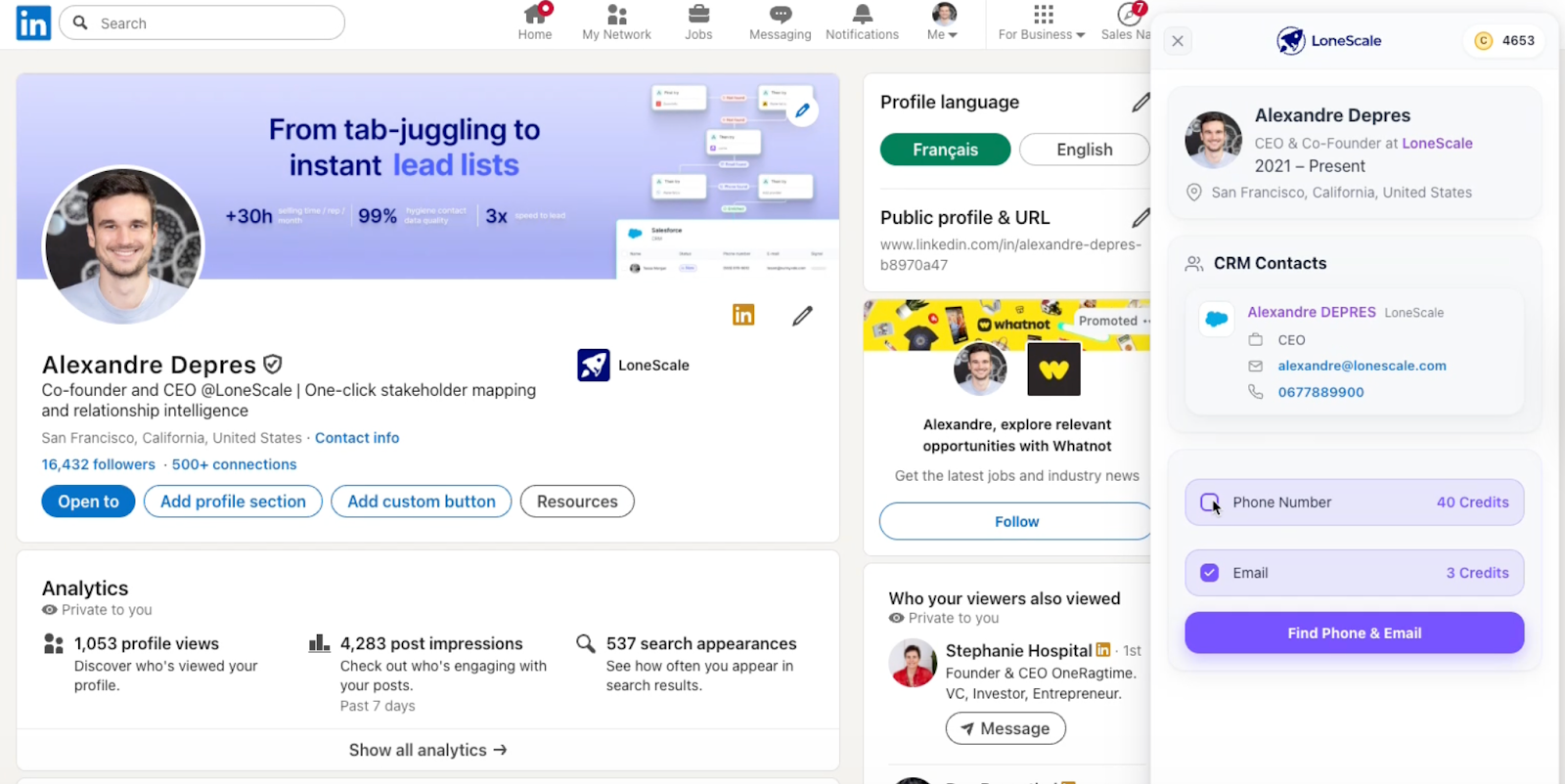
LoneScale is a live contact enrichment and stakeholder-mapping platform that helps B2B sales teams and RevOps identify and connect with the right decision-makers across their target accounts. The platform connects directly to Salesforce and HubSpot, scanning over 25 trusted data sources to verify emails, phone numbers, and LinkedIn profiles so your CRM data always stays fresh and accurate.
LoneScale’s new Chrome extension also covers Surfe’s core use case, adding verified contacts from LinkedIn directly into Salesforce or HubSpot, but without the heavy per-user pricing. While Surfe’s extension costs roughly $48,000 per year for a 100-rep team, LoneScale’s model is outcome-based with unlimited users, giving global teams full enrichment and CRM integration at scale.
Key features and use cases
- Salesforce enrichment and hygiene: One-click sourcing of verified decision-makers, daily updates to buying committees, instant enrichment, and job-change tracking—all inside Salesforce with no manual uploads
- HubSpot enrichment and hygiene: The same automation built natively for HubSpot, delivering continuous data refresh and instant updates for every record
- Waterfall enrichment: Expands data coverage through 25+ verified vendors, applying dynamic country- and segment-based rules for cost-efficient enrichment. Each contact is verified in real time with analytics that optimize vendor performance.
- People Profile API: Get full contact and company information with reverse email look-up. Search for people by job title, persona, or company and get data in seconds with a 99% accuracy rate.
- MQL enrichment: Converts raw inbound leads (from forms, webinars, or events) into rich B2B profiles with 40+ firmographic and technographic fields. Auto-scores, qualifies, and routes leads directly into your CRM, re-checking job changes automatically
- Job-change tracking (champions tracking): Monitors when key stakeholders move roles, updates their records instantly, and triggers outreach sequences or workflows so your reps never lose momentum with proven buyers
- AI research agents: No-code AI Research Agents scan trusted web sources, summarize relevant findings, and feed structured insights directly into your CRM fields
- Chrome extension: Enrich contact information with a single click as you research leads online. Automatically update records in Salesforce and HubSpot without creating duplicate contacts.
Pros and cons
Dynamic, real-time data gives sales teams the insights they need for effective decision-making
Accurate insight drives key business metrics like pipeline, closed-won, and revenue
Easy to set up and implement, so sales teams can start tracking signals within a week
No free trial
Pricing
- Core plan: Starts at $1,000/month. Includes enrichment, job-change, and new-hire tracking, and plug-and-play integrations for Salesforce and HubSpot.
- Team plan: Starts at $2,500/month. Adds higher credit limits, advanced enrichment, and dedicated RevOps support for larger GTM teams.
2. LeadCRM: New LinkedIn-to-CRM data Chrome extension with AI outreach
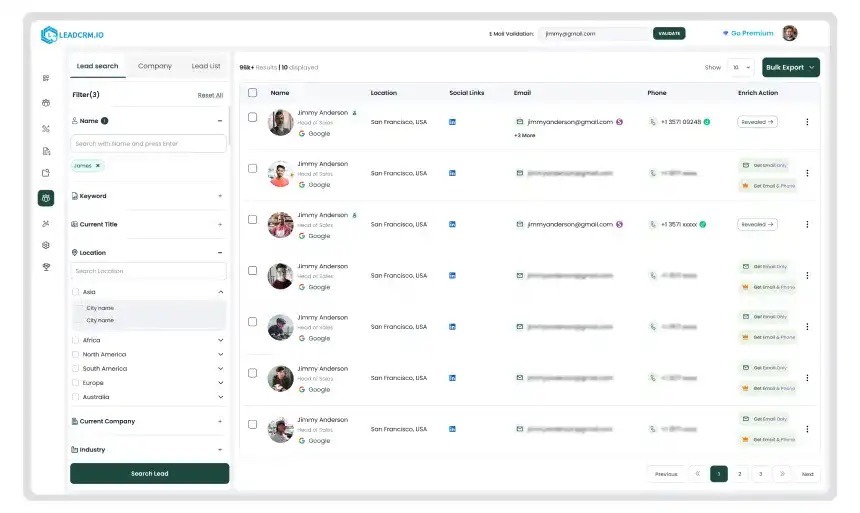
LeadCRM is a LinkedIn-to-CRM workflow platform launched in 2025, making it one of the newest entrants in the enrichment and automation space. It automatically captures profile data, InMails, and connection activity, then enriches each record with verified emails, phone numbers, and company details before syncing them in real time to HubSpot, Salesforce, Pipedrive, and other CRMs. The tool also adds AI engagement features like auto-drafted comments and message suggestions to speed up prospecting directly inside LinkedIn.
Key features and use cases
- Deal and task creation: Create and assign deals or follow-ups straight from LinkedIn, with stage, value, and due dates synced instantly to the CRM
- Real-time duplicate prevention: Detects and blocks duplicate contact or company records as new prospects are added, keeping databases clean
- Team visibility and collaboration: Shows who on your team is already engaging a prospect and what actions are planned, reducing overlap
- Templates and shortcuts: Shared message templates, dynamic placeholders, and keyboard shortcuts to speed outreach and keep messaging consistent across teams
Pros and cons
Automatically fills missing emails, phone numbers, and company info using multiple premium data vendors
Auto-logs messages, InMails, and notes into the right CRM contact record
Supports nine languages with encrypted sync for global teams
New product, occasional UI bugs and frequent feature rollouts
Knowledge base still growing; some users rely heavily on direct support for training
Limited built-in reporting and analytics options
Minor learning curve for first-time CRM automation users
Pricing
- Free tier
- Professional plan: $29.95/month with 150 credits, 200 syncs, and 100 daily Sales Navigator exports. Includes waterfall enrichment and message logging.
- Grow plan: $49.95/month with 400 credits, 400 syncs, and 150 daily exports, plus advanced analytics dashboard
- Ultimate plan: $69.95/month with 900 credits, 1,500 syncs, and 600 daily exports for full LinkedIn-CRM automation
3. ZoomInfo: Enterprise-focused Surfe alternative with global B2B data coverage
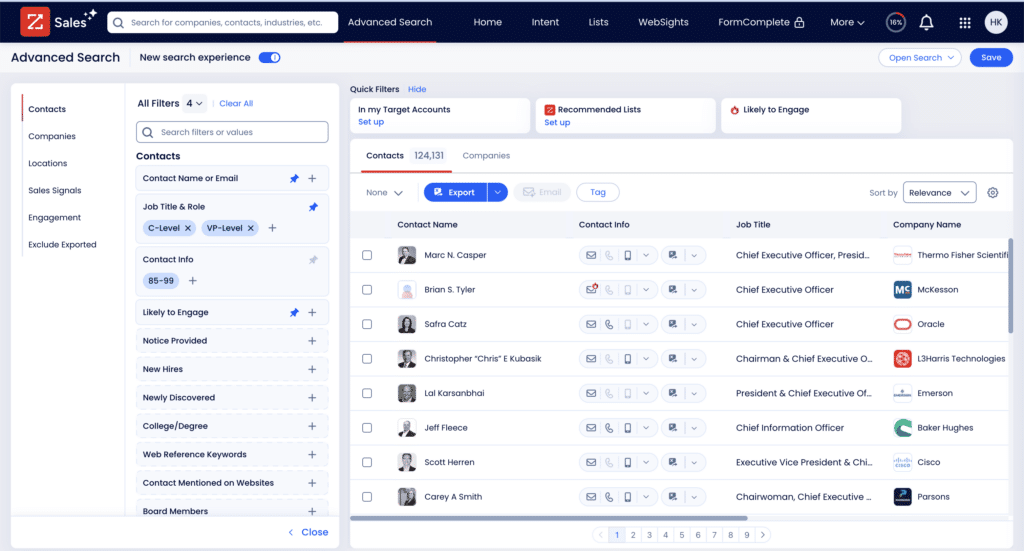
ZoomInfo is a full-scale B2B go-to-market intelligence platform that combines company and contact data, buyer-intent signals, and AI-powered automation for sales, marketing, RevOps, and recruiting teams. Instead of focusing on LinkedIn capture, it delivers an extensive proprietary data universe, including verified phone numbers, emails, and org insights through its platform, APIs, and cloud data shares. Its Copilot and GTM Studio tools layer AI to help teams identify in-market buyers, map buying committees, and automate next-best actions directly within their CRM.
Key features and use cases
- AI-guided prospecting: Copilot and GTM Studio recommend target accounts, buying committees, and next steps
- End-to-end enrichment: Automate data cleansing, deduplication, and enrichment directly in Salesforce, HubSpot, and other CRMs
- Data-as-a-Service (DaaS): Deliver data via APIs, cloud shares, or flat files for analytics and large-scale GTM automation
Pros and cons
Automatic data enrichment reduces duplicates and flags outdated contact information
AI-driven insights and predictive lead scoring improve sales pipeline prioritization
Some users in the EU express concerns with ZoomInfo’s GDPR compliance
Expensive for small businesses or startups, with no transparent pricing
Intent data relies on IP tracking, which is less reliable due to VPNs and remote work
Doesn’t detect new hires with contact enrichment
Pricing
ZoomInfo does not display full pricing upfront. You’re required to create and activate an account to view plans, which adds unnecessary friction if you're just trying to compare costs.
Here’s what’s visible after sign-up:
- Free Plan: Includes 10 reveals per month, basic search, list uploads, HubSpot integration, and access to the Chrome and mobile apps
- Basic Plan: $14,995/year for one seat, includes 200 exports, mobile numbers, bulk exporting, and Intent Lite
- Professional Plan: $17,940/year for three seats (billed annually), adds 450 exports/month, CRM integrations, territory filters, and AI tools like emailer and dialer
4. LeadLoft: Built for affordable, multichannel outbound
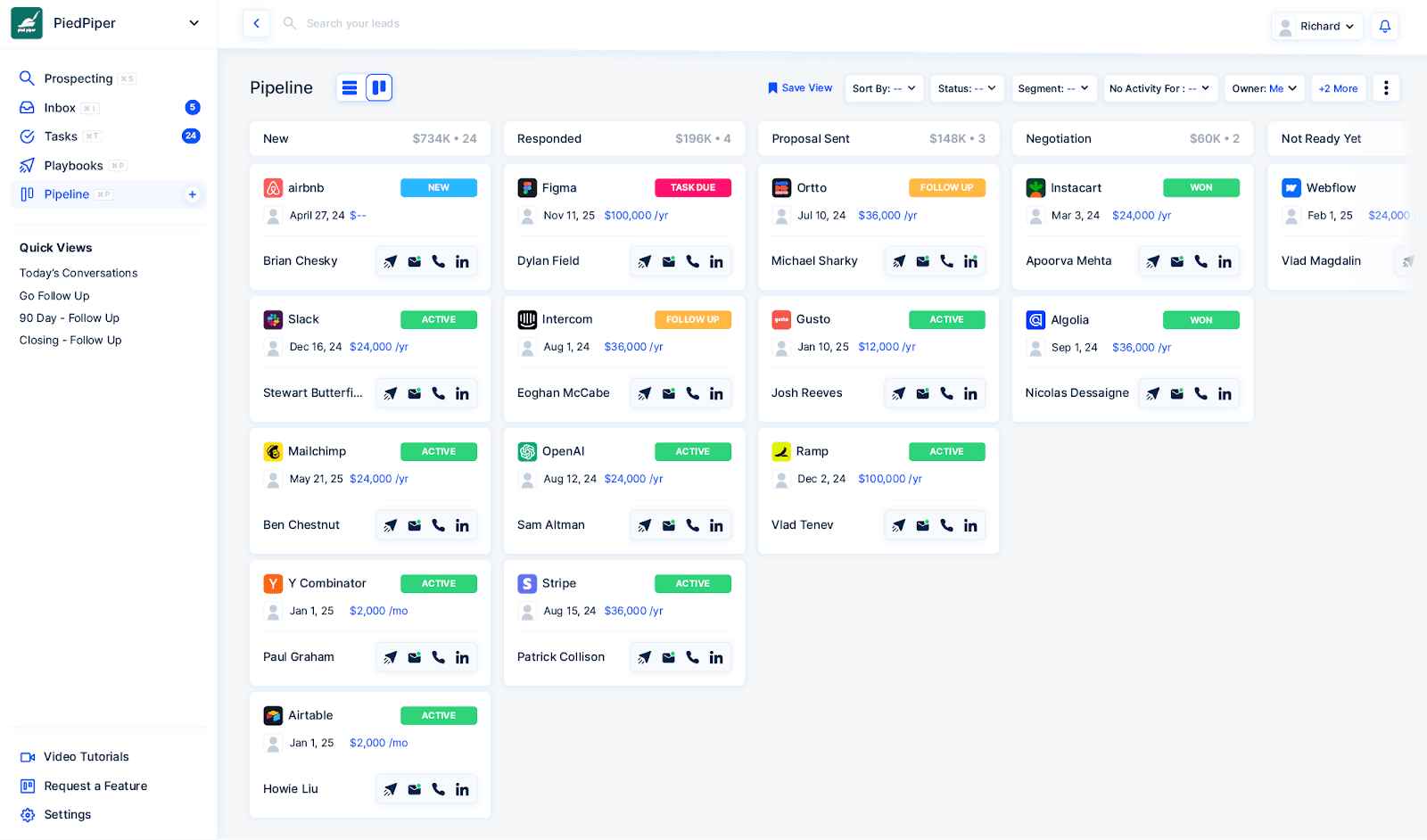
LeadLoft gives smaller teams and startups a single platform to build lead lists, run outreach, and track every conversation. Its built-in AI playbook builder helps automate sequences across channels, while the all-channel inbox keeps every interaction in one place. Alongside its LinkedIn scraper and email/phone finder, LeadLoft supports end-to-end deal management and even offers dedicated fundraising workflows for investor outreach.
Key Features and use cases
- Smart lead scoring: Flags inactive or dead contacts automatically to keep pipelines clean and current
- Dynamic lead lists: Auto-update as new prospects match filters or respond to outreach
- Competitor tracking: Monitors activity from many competitors to help refine targeting and messaging
- Collaboration tools: Shared visibility into tasks and deal progress for distributed teams
Pros and cons
LinkedIn and email automation helps build and engage lead lists quickly
Unlimited prospecting for a fixed price gives smaller teams predictable costs
Limited reporting and campaign analytics
Missing advanced calling features like a power dialer
Occasional need for manual filtering or data organization inside pipelines
Still growing knowledge base and self-serve documentation
Pricing
LeadLoft offers a 7-day free trial with all plans, including unlimited prospecting and custom onboarding.
- Unlimited plan: $99/month per user with LinkedIn automation, database access, CRM tracking, and unlimited prospecting
- Scale AI plan: $400/month per user with advanced AI tools, website integration, and success sessions
- Managed Service: Custom quote for teams that want a hands-off setup with managed outreach, 600–1000 qualified leads, optimized messaging, and 30–60 meetings booked per quarter
5. Cognism: Best for large teams that prioritize mobile-verified leads
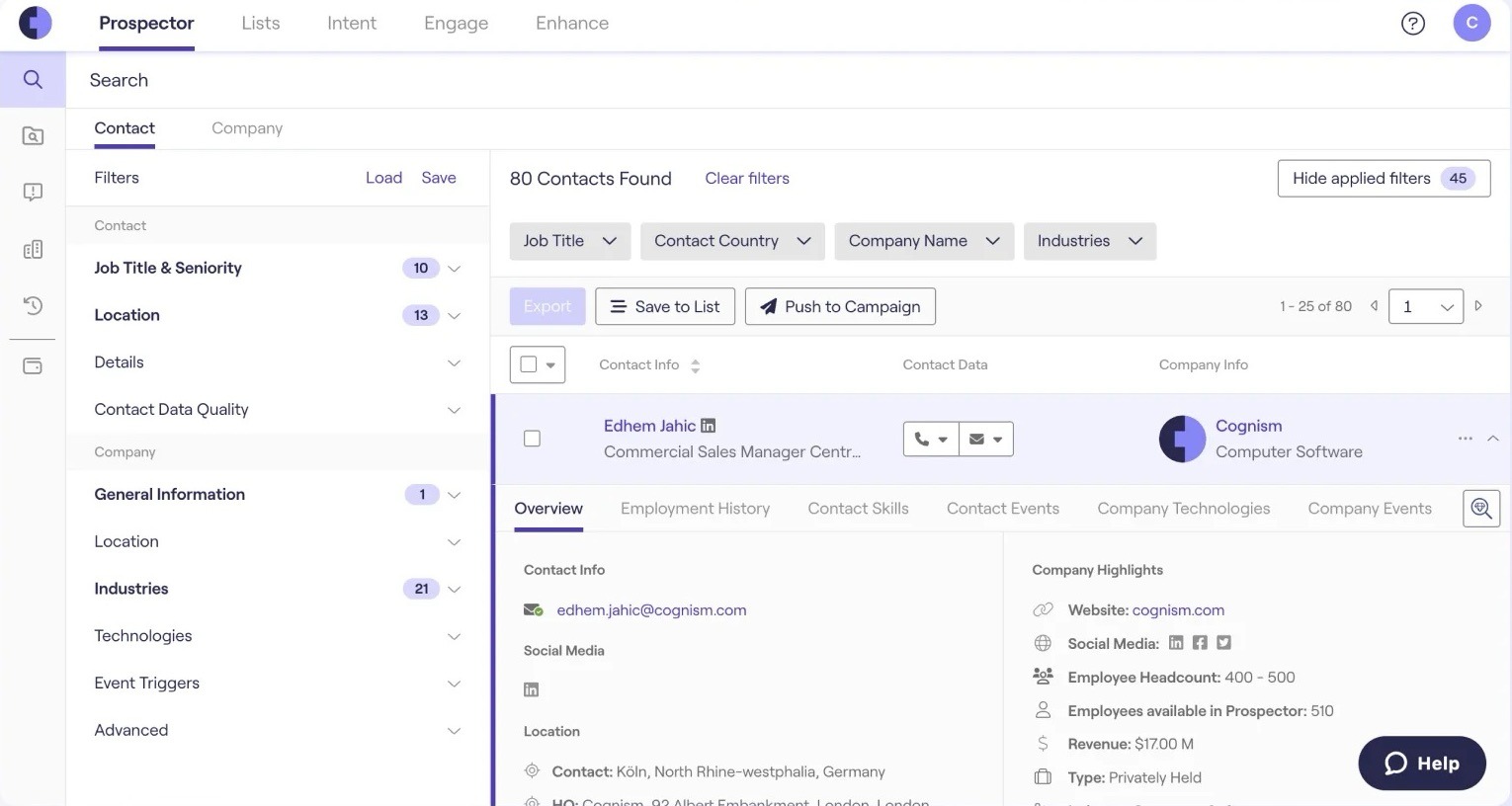
Unlike Surfe’s LinkedIn-centric CRM extension, Cognism operates as a data-first platform, offering phone-verified Diamond Data, Bombora intent signals, and governed AI models like Cortex AI for lead discovery, validation, and enrichment. With GDPR-aligned sourcing and international coverage across Europe, the Middle East, and Africa (EMEA), North America (NAM), and Asia-Pacific (APAC), Cognism is ideal for revenue teams that rely on compliant, continuously updated data to drive large-scale prospecting and enrichment across multiple markets.
Key features and use cases
- Diamond Data: Delivers phone-verified mobile numbers for direct, compliant outreach
- Cortex AI: AI engine that validates, enriches, and recommends high-fit contacts and companies
- Intent data integration: Uses Bombora signals to identify in-market accounts and prioritize outreach
- Browser extension: Capture and enrich leads from LinkedIn and company websites in real time
Pros and cons
Reliable mobile and direct dial coverage (Diamond Data) that speeds outbound prospecting
Intuitive interface with advanced filters to refine and segment lead lists
Occasional outdated or duplicate contact information, especially in niche industries
Personal phone numbers may appear in some datasets
Exporting or redeeming contacts can feel confusing for new users
Limited intent data volume compared to larger competitors like ZoomInfo and LoneScale
Pricing
Cognism does not publish official pricing on its website and instead offers custom, quote-based plans that vary by team size, region, and features.
However, according to trusted third-party sources and Reddit threads the pricing typically falls between €20,000/year for smaller teams (around 10 users) and $25,000–$50,000/year for larger deployments with broader data access and integrations.
6. RocketReach: For a solo salesperson who needs fresh company datasets
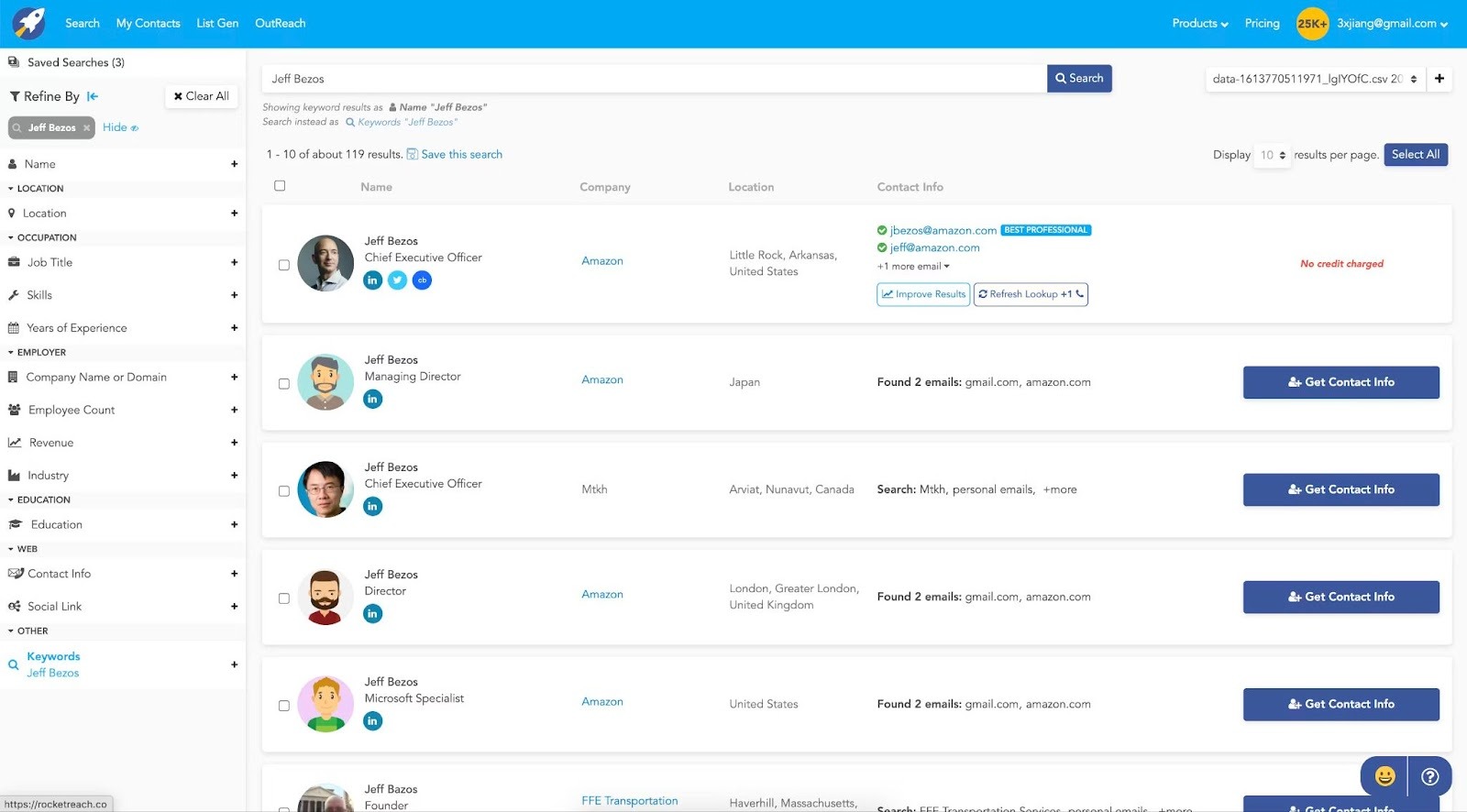
RocketReach is a sales and lead intelligence platform that helps teams find and connect with verified contacts faster. It provides email and phone enrichment, company profiles, and social links for millions of professionals across industries. With its web app, Chrome extension, and CRM integrations, teams can search, save, and sync leads directly into their workflows.
Key features and use cases
- Contact discovery: Access over 700 million professionals across 35+ million companies
- Real-time verification: Emails are validated live with bounce prevention and confidence scores
- Prospecting filters: Narrow searches by title, company, seniority, location, industry, and more
- Chrome extension: Instantly find contact details on LinkedIn and company websites
- AI suggestions: Get automatically generated lead lists based on your ICP
Pros and cons
Cost-effective entry point for small teams
Intuitive Chrome extension
Time-saving bulk processing that reduces prospecting time by 40–60% according to sales teams
No free plan
Does not include outreach tools, lead scoring, or buyer intent signals. You’ll need to use other platforms to run sequences or track engagement.
Aggressive auto-renewals with multiple complaints about unexpected $99+ charges
CRM sync issues, where 20% of HubSpot/Salesforce users report missing fields
Outdated job titles in 15–20% of profiles according to recruitment agencies
Pricing
- Essentials plan: $99/month, includes 100 lookups per user. Email-only access. Offers 100 exports per month (1,200/year), org charts, company trends, API access, Chrome extension, Zapier integration, and up to 5 Autopilot jobs.
- Pro plan: $165/month, includes 250 lookups per user. Adds mobile and direct phone numbers, 250 exports per month (3,000/year), technographics, and integrations with Salesforce, HubSpot, Outreach, Salesloft, and Bullhorn. Increases Autopilot capacity to 10 jobs. Email limit remains 500/day.
- Ultimate plan: $300/month, includes 500 lookups per user. Offers 500 exports per month (6,000/year) and supports up to 25 active Autopilot jobs. Includes all features from the Pro plan.
- Enterprise plans: Custom pricing
7. Findymail: For non-EU prospecting and email enrichment
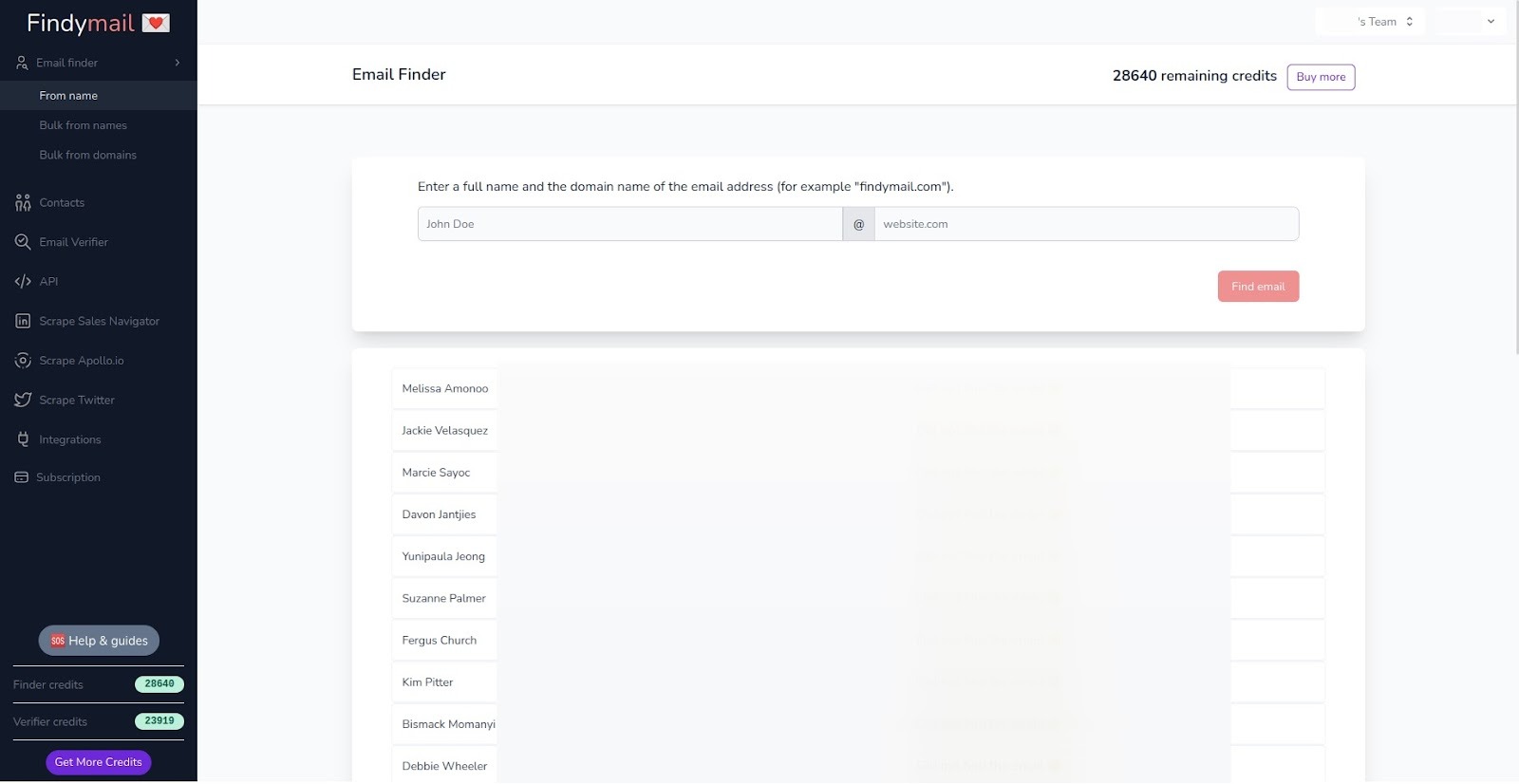
Findymail is a dedicated email-finding and verification platform designed to plug into any outbound workflow. It combines a web app, Chrome extension for LinkedIn and Sales Navigator, bulk enrichment dashboard, REST API, and a Google Sheets add-on that works like a built-in formula for sourcing verified emails at scale.
Key features and use cases
- Chrome extension: Extracts verified contact info directly from LinkedIn and Sales Navigator profiles
- Bulk enrichment: Upload CSV files to enrich hundreds or thousands of contacts in one go
- API access: Automate enrichment workflows or integrate Findymail with your CRM or outreach tools
- Intellimatch AI: Interprets natural-language queries to find and qualify leads automatically
Pros and cons
Intuitive interface simplifies list creation and data enrichment
Users report bounce rates under 2%, which is considered a very high accuracy
Phone number data is restricted to non-EU contacts
Doesn’t integrate with many platforms for automated exports
Pricing
- Basic: $49/month, includes 1,000 finder credits and 1,000 email verifications (roughly 1,000 emails or 100 phones)
- Starter: $99/month, includes 5,000 finder credits and 5,000 verifications (5,000 emails or 500 phones)
- Business: $249/month, includes 15,000 finder credits and 15,000 verifications (15,000 emails or 1,500 phones)
8. Lusha: For emails and phone numbers
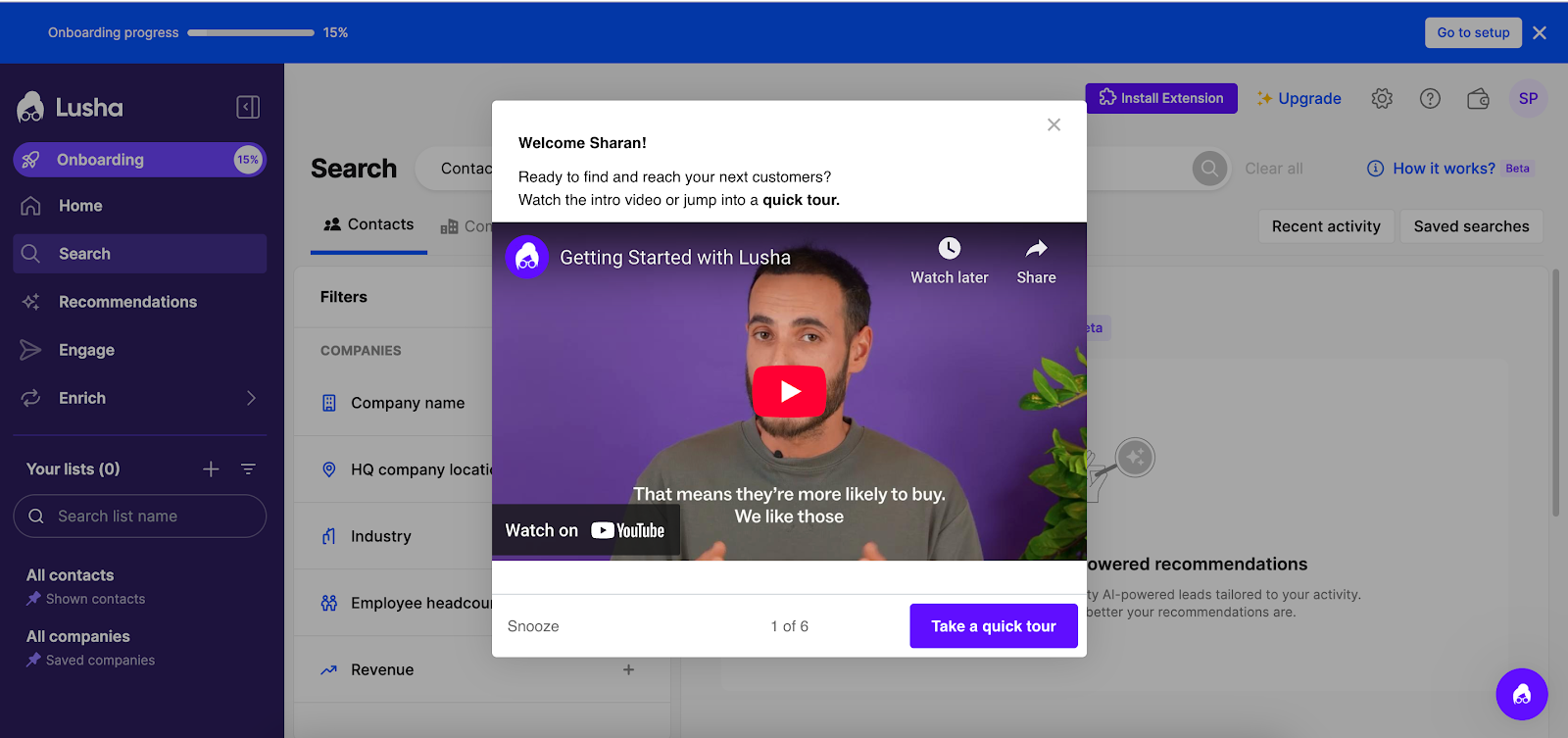
Lusha is good for teams that want fast access to direct dials and emails without the added complexity of end-to-end engagement platforms. Its clean interface, strong contact enrichment, and lightweight outreach features make it a practical fit for smaller sales teams or Sales Development Representatives (SDRs) focused on outbound prospecting.
Key features and use cases
- Lead generation tools: Build targeted prospect lists using advanced search filters like industry, seniority, location, and company size
- Intent data integration: Connects with Bombora to highlight companies actively researching solutions in your space, signaling buyer intent
- AI-powered recommendations: Suggests new leads based on your sales behavior and ideal customer profile
- Playlists (dynamic lists): Creates AI-updated prospecting lists that evolve based on your sales activity
- Workflow automation: Automates lead enrichment, CRM syncing, and outreach triggers to keep your pipeline full with minimal manual effort
Pros and cons
Provides access to a large, global database of over 150 million business profiles, offering verified direct phone numbers and email addresses of decision-makers
Operates on a credit-based pricing system, allowing users to pay only for the data they need
Users can enrich multiple contacts at once, saving time and improving the efficiency of lead generation and CRM data management
The credit system means that phone numbers (10 credits each) are significantly more expensive than emails (1 credit each), which could limit outreach for users with smaller budgets
Does not provide a full suite of marketing automation tools, such as campaign management or advanced segmentation
Pricing
- Free plan
- Pro plan: $22.45/month per seat (billed annually), with 3,600 credits, CSV enrichment, and basic analytics
- Premium plan: $52.45/month per seat (billed annually), with 9,600 credits, advanced analytics, and more enrichment features
- Scale plan: Custom pricing
Power your pipeline with verified signals from LoneScale
Choosing between Surfe alternatives comes down to one thing: what you expect your CRM to do for you. Some teams just want faster LinkedIn syncing, while others need richer contact data, better enrichment, or full visibility into job and organizational changes.
If you’re looking for a tool that powers real-time, signal-driven sales workflows, try LoneScale. It goes beyond browser extensions to deliver verified contact enrichment, job-change tracking, and multi-source data refreshes that keep every record accurate.
LoneScale unifies 25+ trusted data providers to give sales and RevOps teams live, compliant, and activation-ready contact data, directly in Salesforce or HubSpot.
Want to scale with intent? Start with LoneScale.
You don’t need more leads. You need better ones.
LoneScale filters out the noise so your team focuses only on high-fit, high-intent prospects.
Ready to turn buying signals into revenue?
LoneScale's signal-based orchestration platform helps you identify ready-to-buy prospects and turn them into real opportunities.