ZoomInfo vs Apollo
ZoomInfo vs. Apollo vs. LoneScale: Which is better for your team?
Which lead enrichment platform is right for you? Compare ZoomInfo, Apollo, and LoneScale in this article to find out.
ZoomInfo vs Apollo

ZoomInfo vs. Apollo
vs. LoneScale:
Which is better for your team?
When every sales platform promises accurate data and smarter outreach, it’s easy to wonder which one actually delivers. For sales and marketing teams fine-tuning their marketing strategies, the question is about data accuracy, workflow efficiency, and real results.
That's why we compared ZoomInfo vs Apollo.io. Both tools promise scale and automation, but differ in how they handle data retrieval, user-submitted data, and EMEA contact data. And with LoneScale now emerging as a real-time alternative, the landscape has shifted again.
In this guide, we look at all three platforms, covering basic features, pros and cons, and customized enterprise bundles, to help you choose the right fit for your target audience, improve user satisfaction, and better track engagement across your pipeline.
Zoominfo vs. Apollo: Quick overview + LoneScale

ZoomInfo
- Enterprise-grade data coverage across 100M+ companies and 200M+ contacts
- Built-in enrichment, intent data, and sales automation
- Advanced CRM integrations and marketplace connectors

.svg)
Apollo.io
- All-in-one prospecting, enrichment, and outreach workspace
- AI-powered sequences and integrated dialer
- Affordable for SMBs with transparent, credit-based pricing


LoneScale
- Real-time, signal-based data enrichment and CRM hygiene
- Waterfall enrichment via 25+ vendors
- Stakeholder mapping and champion tracking in Salesforce/HubSpot
- AI agents that automate qualification and research using live web data

1. ZoomInfo: Ideal for large enterprises
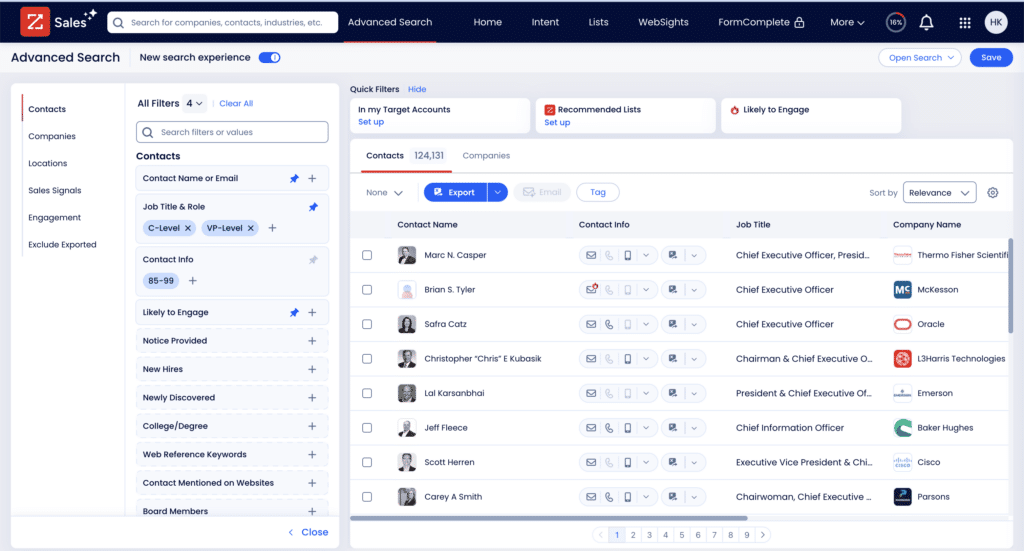
ZoomInfo is a B2B sales intelligence platform designed for enterprises that need extensive data coverage and advanced sales automation. It offers verified contact data, firmographics, technographics, and intent signals to help sales and marketing teams identify prospects and automate enrichment across CRMs.
While its integration capabilities and advanced search filters make it effective for complex sales operations, ZoomInfo’s database relies heavily on static, third-party sources that may lack real-time accuracy.
Key features and use cases
Pros and cons
Automatic data enrichment reduces duplicates and flags outdated contact information
AI-driven insights and predictive lead scoring improve sales pipeline prioritization
Some users in the EU express concerns with ZoomInfo’s GDPR compliance
Expensive for small businesses or startups, with no transparent pricing
Intent data relies on IP tracking, which is less reliable due to VPNs and remote work
Doesn’t detect new hires with contact enrichment
Pricing
ZoomInfo does not display full pricing upfront. You’re required to create and activate an account to view plans, which adds unnecessary friction if you're just trying to compare costs.Here’s what’s visible after sign-up:
- Free Plan: Includes 10 reveals per month, basic search, list uploads, HubSpot integration, and access to the Chrome and mobile apps
- Basic Plan: $14,995/year for one seat, includes 200 exports, mobile numbers, bulk exporting, and Intent Lite
- Professional Plan: $17,940/year for three seats (billed annually), adds 450 exports/month, CRM integrations, territory filters, and AI tools like emailer and dialer
Verdict: ZoomInfo is best suited for large enterprises that need vast global data coverage, built-in enrichment, and advanced sales automation at scale. But for teams that depend on real-time accuracy and signal-based insights, its static database and costly enterprise plans make it a less agile choice. In this case, a ZoomInfo competitor could be a better fit.
2. Apollo: Suitable for small to medium-sized businesses
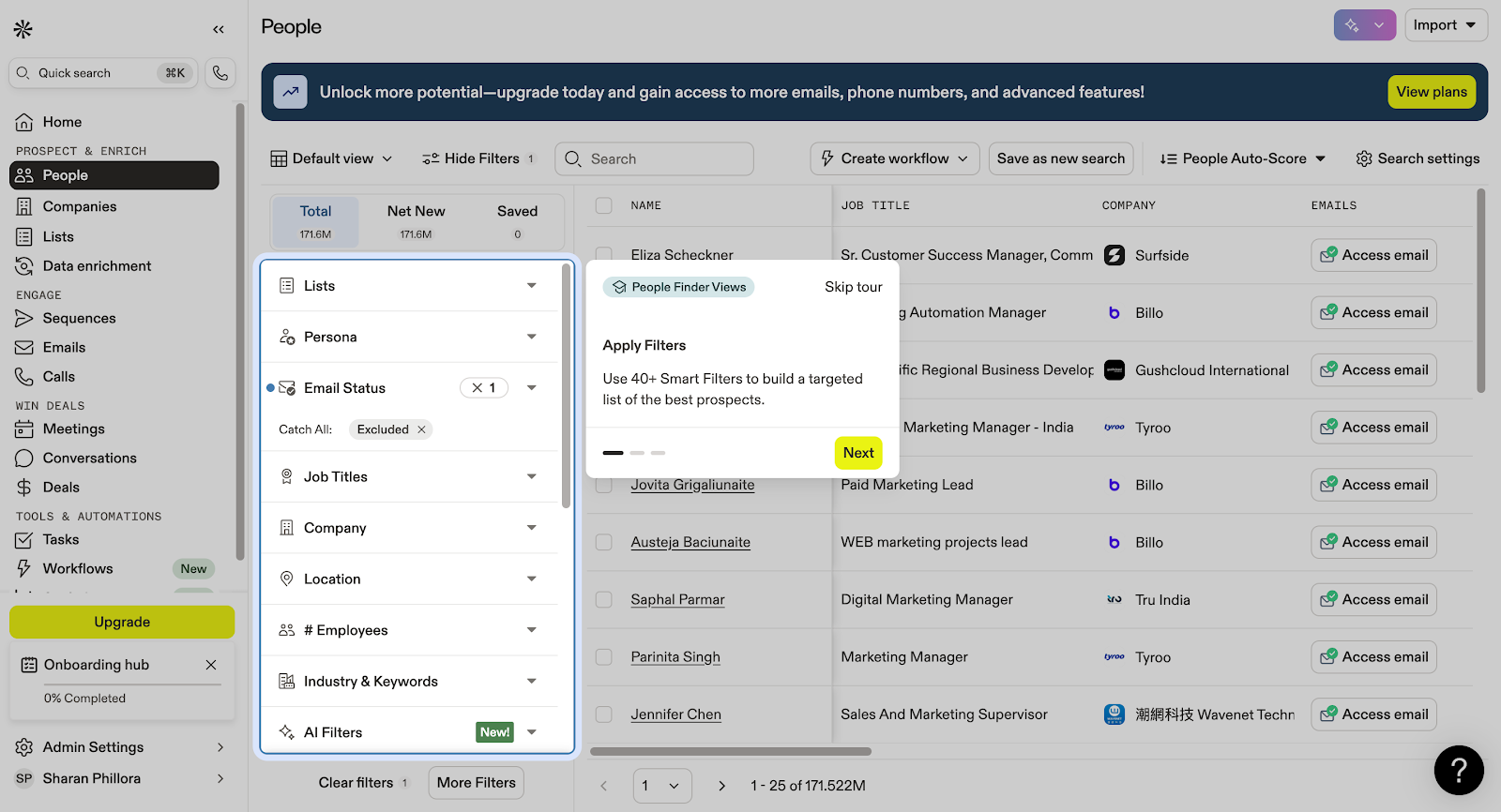
Apollo.io is an AI-powered sales engagement platform that combines prospecting data, enrichment, and automation in a single workspace. It helps sales and marketing teams run their entire sales process, from lead generation to follow-up, without leaving the platform.
Unlike ZoomInfo, Apollo offers transparent pricing, including a free plan, making it cost-effective for smaller businesses. It delivers up-to-date contact data, intent signals, and sequencing tools for email, calls, and outreach campaigns. With strong integration capabilities for CRMs like Salesforce and HubSpot, Apollo improves workflow efficiency, enhances data quality, and supports faster sales automation with AI-driven insights.
Key features and use cases
Pros and cons
Automated workflows and AI-powered features streamline outbound
Integrates with major CRMs for efficient data management
Inconsistent data accuracy, especially for non-U.S. contact data
Credit-based pricing structure adds unexpected costs and limits scale
Lacks flexibility for teams that only need data enrichment without full outreach features
Pricing
- Free Plan: Includes 1,200 credits/year, 2 sequences, basic filters, and Gmail/Salesforce extensions
- Basic Plan: $59/user/month includes 60,000 credits/year, CRM integrations, enrichment, meeting scheduling, and advanced filters
- Professional Plan: $99/user/month adds unlimited sequences, US dialer, automated workflows, AI research, and 5 mailboxes per user
- Organization Plan: $149/user/month (min. 3 users, billed annually) includes 180,000 credits/year, international dialer, 15 mailboxes per user, advanced security, SSO, and custom reporting
Verdict: Apollo is suitable for small to medium-sized businesses looking for an all-in-one sales engagement platform with transparent pricing. However, if you’re looking for a tool with a more comprehensive list of providers for data enrichment, consider an Apollo.io competitor.
3. LoneScale: Best for teams focusing on data enrichment and intent data
LoneScale is a sales intelligence and data orchestration platform built for sales and marketing teams. The platform specializes in stakeholder mapping, automatically identifying and enriching the full buying committee with verified contact data, role details, and live buying signals.
The platform runs on dynamic, real-time data to keep records fresh and reliable:
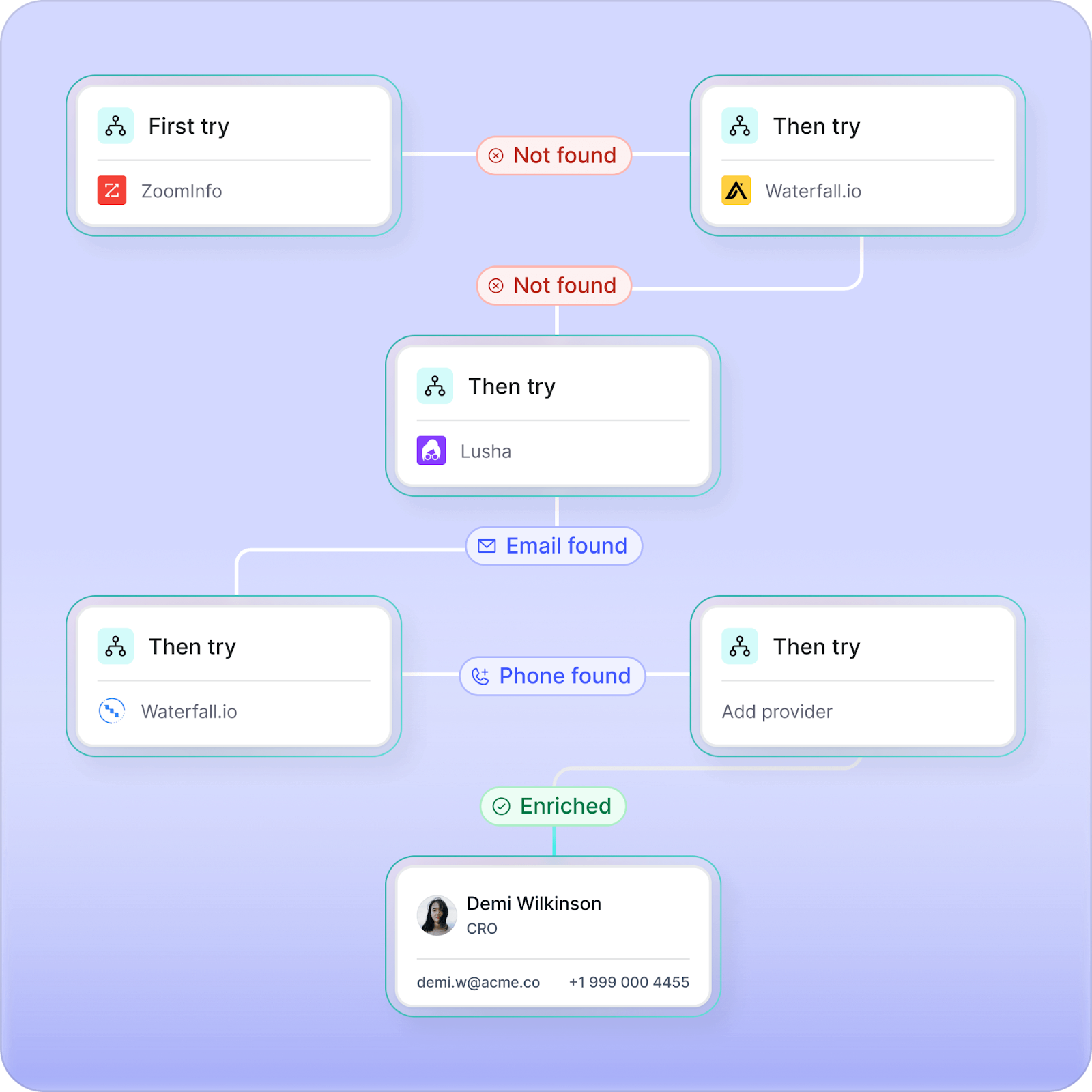
- Waterfall enrichment ensures the most complete and accurate profiles by layering multiple verified data sources when one provider fails
- MQL enrichment connects leads to accounts in Salesforce, enriching every inbound MQL with firmographics, contact data, and buying intent
- CRM enrichment and hygiene continuously updates and cleans your Salesforce data, removing duplicates and flagging outdated information automatically
- AI agents automate qualification and research in Salesforce and HubSpot, scanning trusted web sources to enrich every record with verified insights and AI-generated summaries
Key features and use cases
Pros and cons
Dynamic, real-time data gives sales teams the insights they need for effective decision-making
Accurate insight drives key business metrics like pipeline, closed-won, and revenue
Easy to set up and implement, so sales teams can start tracking signals within a week
Fast, plug-and-play CRM integration
No free trial
Limited notification customization options
Pricing
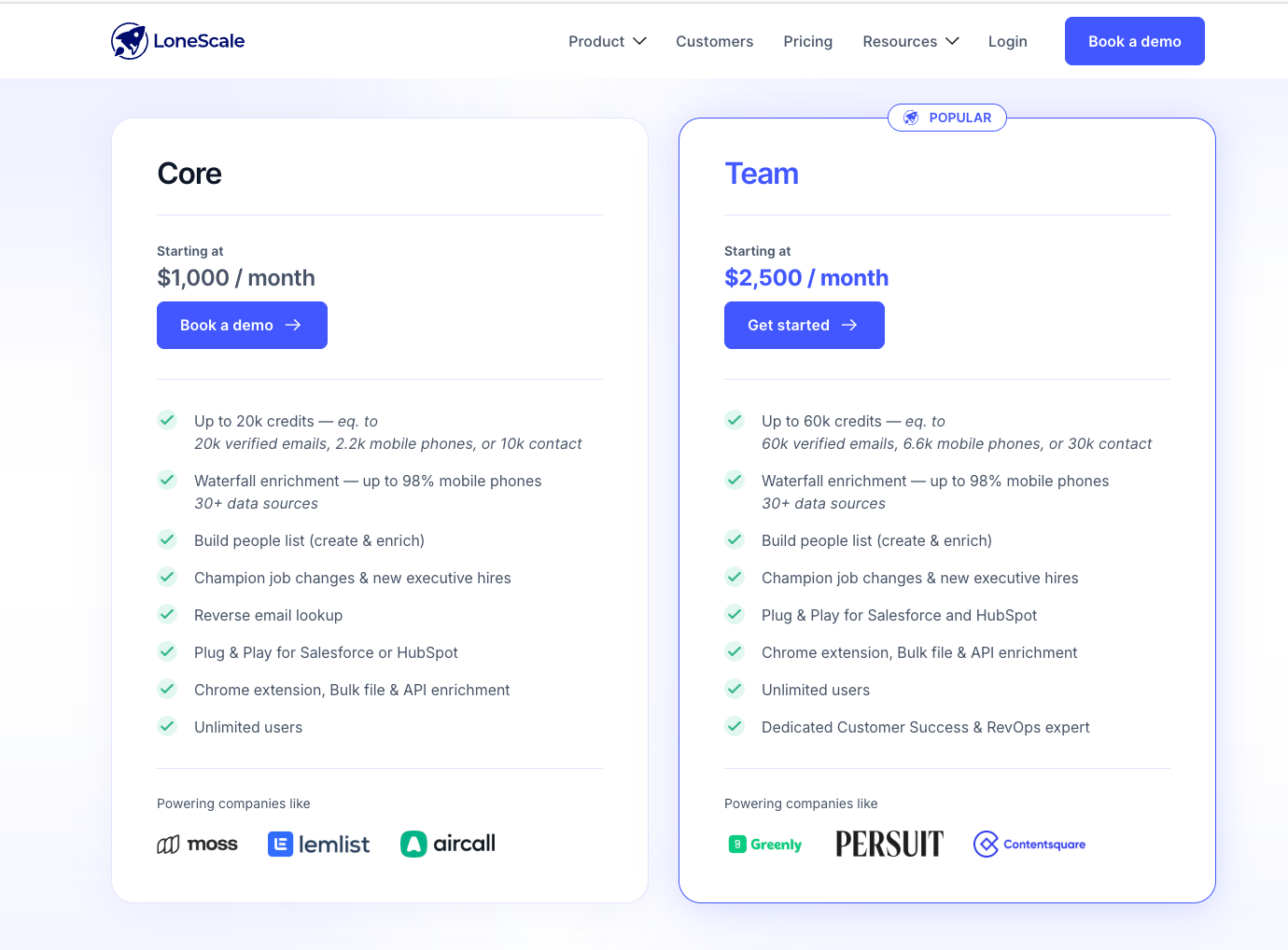
- Champion Tracking plan: Starts at $1,000/month
- Signal-based Orchestration plan: Starts at $2,500/month
Verdict: LoneScale is best for teams focusing on contact enrichment and intent data, especially when tracking job changes and monitoring buying signals
ZoomInfo vs Apollo vs LoneScale: Lead generation + data enrichment feature comparison
The best choice depends on your lead generation efforts
Choosing between ZoomInfo, Apollo.io, and LoneScale depends on your team’s size, goals, and data priorities. Each tool approaches sales intelligence differently.
ZoomInfo works best for enterprises handling complex data needs, offering an extensive database and advanced search capabilities. But it’s still just a database: strong on reach, weaker on freshness.
Apollo.io provides cost-effectiveness, automation capabilities, and a user-friendly interface, good for smaller sales and marketing teams, though its data accuracy can be inconsistent. Not ideal when you need consistently strong data.
LoneScale, however, goes beyond data and enrichment. It delivers real-time, accurate, and comprehensive data, stakeholder mapping, champion tracking, and CRM hygiene automation. With waterfall enrichment, MQL enrichment, and data compliance built-in, it’s the right data provider for teams that want valuable insights, sales strategies, and faster business growth.
You don’t need more leads. You need better ones.
LoneScale filters out the noise so your team focuses only on high-fit, high-intent prospects.
Ready to turn buying signals into revenue?
LoneScale's signal-based orchestration platform helps you identify ready-to-buy prospects and turn them into real opportunities.