
Contact Enrichment API
Learn how embedding a contact enrichment API into your product delivers better data, smarter segmentation, and new revenue opportunities.


Why contact enrichment APIs are essential for business growth in 2026
Data shows that half of wage and salary workers stay with their current employer for less than four years, and more than one in five have been in their current role for a year or less.
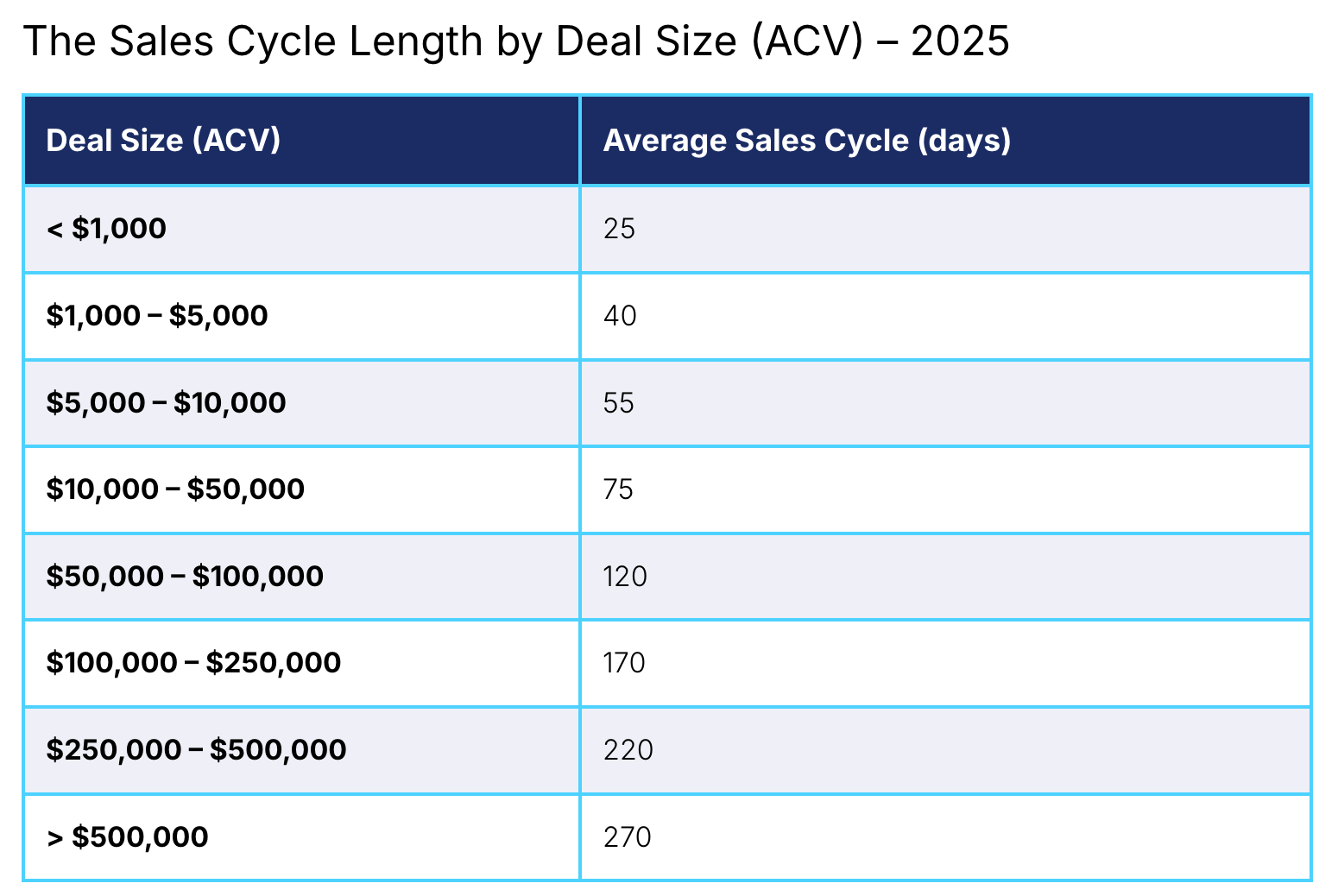
Over the course of a typical B2B sales cycle (25 to 270 days, depending on the deal size), a significant share of the contact data your product and users depend on will become outdated.
A contact enrichment API solves this by turning fragmented, disparate data points into enriched data. It does this by continuously updating profiles with verified data points—such as job titles, seniority, phone numbers, and company information from trusted external sources, so your product always surfaces accurate, complete data without extra effort from your users.
In this article, we look at how a contact enrichment API works, how embedding it directly into your product elevates the user experience, and why always-on enrichment is now essential for driving better outcomes, new revenue streams, and long-term growth.
What is a contact enrichment API?
A contact enrichment API is a backend service your product calls to automatically fill in missing or outdated contact details using verified external data sources. From a minimal identifier such as an email address, company domain, LinkedIn URL, or a combination of name and company, the API can look up the right person. It then returns dozens of attributes, including job title and seniority, phone numbers, LinkedIn profile, company size, industry, revenue, employee count, and location.
For modern SaaS products, this enrichment process is treated as core product infrastructure rather than a one-off utility. The API aggregating data from many providers gives you deeper insights into customers, customer behavior, and market trends, rather than relying on a single, static database.
Modern platforms may also apply machine learning to spot patterns across disparate data points and suggest high-value contacts or accounts, helping teams make more data-driven decisions.
How a data enrichment API works
In most products, a data enrichment API runs as a background service inside your business processes, rather than something users have to trigger manually. Your app sends existing data and identifiers to the API, the provider standardizes and enriches that data, and then your system writes the updated fields back into your own database and records as enriched data.
This process reduces manual data entry and the risk of inaccurate data flowing into downstream workflows.
A typical enrichment process looks like this:
- Submit identifiers: Your product sends an API request with identifiers such as email addresses, domains, social profiles, or a name-and-company combination, using an API key to control access and apply enrichment rules.
- Resolve and identify entities: The enrichment API matches those inputs against external datasets. It handles variations in job titles, company names, and social profiles to correctly identify the right person and account.
- Validate and score data: Returned fields go through checks like confidence thresholds, source validation, and aggregation logic. This helps filter out low‑quality data before anything reaches your product or CRM.
- Field mapping and standardization: The API normalizes formats for job titles, company size, phone numbers, and other attributes, then maps them into your schema so you avoid duplicates and inconsistent values across integrations.
- Return enriched data: Finally, the API responds with structured data that your product writes into existing records. From there, routing rules, lead scoring, personalization, and reporting can immediately run on clean, enriched profiles without extra user effort.
Real-time vs. batch enrichment
Once you understand what a typical enrichment flow looks like, the next decision is when enrichment should run. This can be in real time as records are created or updated, in batches on a schedule, or both.
Real-time enrichment runs during live events, such as form submissions, lead creation, or workflow triggers. The API returns additional data in the moment, so routing, scoring, and personalization are all based on the most up-to-date contact and account information. This helps teams respond fast and keeps frontline decisions aligned with what’s true about a buyer right now.
Batch enrichment runs at set intervals, such as nightly, weekly, or monthly, and updates large volumes of existing records in one go. Ops and RevOps teams use it for CRM backfills after switching providers, cleaning up older records, and refreshing fields like titles, phone numbers, and company details across thousands of contacts at once. However, that means the data is never fully up to date.
Your records are only as accurate as the last batch. If a buyer changes jobs, gets promoted, or switches teams the day after a weekly sync, every workflow that relies on that record will still use old information until the next run.
For time-sensitive work like routing hot inbound leads, pausing outreach to people who have left a company, or acting on job-change signals, you need real-time enrichment. Batch enrichment alone cannot support that.
Why always-on enrichment outperforms static databases
Deciding between real-time and batch tells you when enrichment runs. The next decision is what it runs against: a static contact database you refresh occasionally, or an always-on enrichment service that updates records whenever something changes.
Static databases decay quickly. In fact, contact data decays by 30–50% per year, which means a significant portion of any static dataset becomes inaccurate long before the next refresh cycle. Even modest B2B deals (around $10,000–$100,000) often take 2–4 months to close, and larger contracts can take most of a year, which is plenty of time for a static contact list to become outdated.
In that gap, your product points users to the wrong contacts, triggers workflows based on outdated attributes, and powers reports with records that no longer reflect reality. An always-on enrichment API turns that static list into a living system that continuously refreshes contacts, so your product stays trustworthy by default.
Always-on enrichment addresses this by validating and updating contact data continuously. The system keeps records aligned with current information as changes occur or when teams interact with the data. This reduces the window in which records can go stale and limits the downstream impact of inaccurate inputs.
As a result, always-on enrichment supports reliable outreach, clean automations, and trustworthy reporting.
4 Benefits of a contact enrichment API
Embedding a contact enrichment API turns data quality into a visible part of your product’s value proposition. Here’s how.
Better UX with zero manual work
Imagine you provide a demand gen tool, and a marketer uploads a list of emails for outreach. With an enrichment API, these marketers can instantly add job titles, seniority, company size, and phone numbers, without leaving your product or buying credits elsewhere. The user just sees that their list is ‘magically’ complete and ready to segment by role, industry, or company size.
Now, let’s imagine you offer dialer software. A sales rep clicks “Import from CRM,” and your product enriches missing direct dials and updates old titles before they ever start calling. This makes your product feel easy, fast, and reliable.
Adding a contact enrichment API to the backend of your product provides users with a better experience. It turns a once tedious task into a simple, one-click flow.
2. Stronger outcomes for your customers
Better data directly improves the results your customers see. For example, a demand gen platform can use enriched titles and seniority to send campaigns only to decision-makers, which usually leads to more replies and meetings from the same list. A recruiting or ATS product can enrich candidates with updated roles and company info, so sourcers reach people who are still relevant for the role, not those who moved on months ago.
When customers see higher connection rates, better targeting, and more pipeline, they connect that success to your product.
3. New ways to make money
Once enrichment is built in, you can decide how much of it is included by default and how much becomes a paid upgrade.
For example:
- A base plan could include enrichment for standard fields like title and company
- A higher plan could unlock direct phone numbers, extra contacts per account, or intent-style signals
- You could also charge based on the number of records enriched each month
This turns data quality into a clear value lever: customers pay more when they want deeper data, more volume, or more frequent updates. It’s easy to justify because they can see the impact on their campaigns, calls, or hires.
4. A stickier, harder-to-replace product
When your product keeps contacts up to date every day, teams start to depend on it as their source of truth. A sales team might build routing, scoring, and dashboards on top of the enriched fields your product maintains. A recruiting team might rely on your tool to know when candidates change jobs.
If they removed your product, they would lose the system that keeps their data usable, not just a feature. That makes it much harder to churn and much easier for you to expand usage across more seats, teams, or business units.
LoneScale’s contact enrichment API: How it works
LoneScale lets your product use Contact Enrichment and Waterfall enrichment through the LoneScale Public API. Your app sends simple identifiers such as an email, domain, or LinkedIn URL, and the API returns a complete, verified contact and company profile with emails, mobile phones, LinkedIn, and firmographic data, already cleaned and formatted.
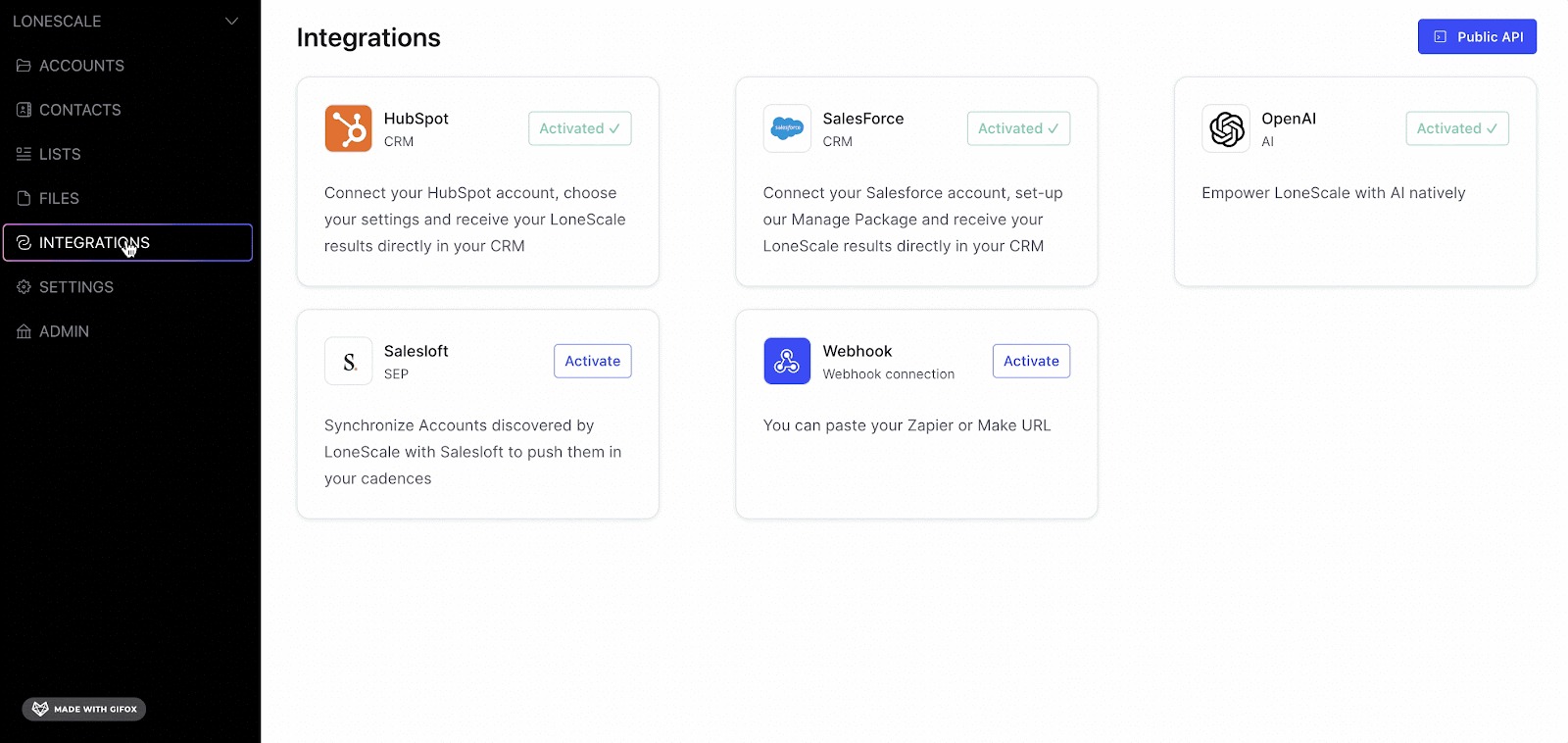
Waterfall enrichment checks more than 25 external providers (including Apollo, Cognism, and Lusha) in a smart order to find the best email and phone for each contact, using rules based on country and segment, so you get high coverage without wasting credits.
This same enrichment engine powers:
- CRM enrichment and hygiene: LoneScale keeps Salesforce and HubSpot contacts enriched and refreshed on a schedule or when records change, so your customers always see up-to-date buyers and stakeholders in their CRM.
- MQL enrichment: When a lead comes from a form, webinar, or event with only an email, the LoneScale API turns that email into a full B2B profile and pushes the enriched lead back into your product and into the CRM.
- Contact signals and account signals: LoneScale tracks job changes, new hires, and hiring intent at target accounts, enriches the new roles with fresh contact data, and syncs those updates into your product and into Salesforce or HubSpot.
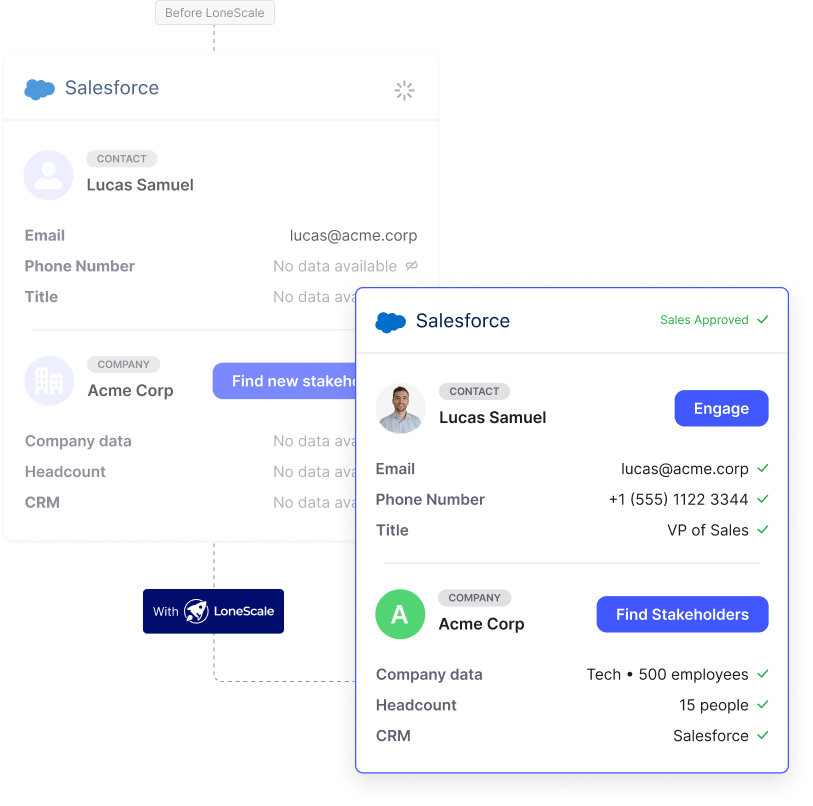
From your product team’s point of view, the flow is simple. Your application calls the LoneScale Public API, LoneScale runs the enrichment and vendor waterfall in the background, and your application saves the enriched contact or account to your own database or to the connected CRM.
This is how you offer “always up-to-date” contacts and signals inside your product without building and maintaining your own enrichment stack.
Grow revenue and retention by embedding contact enrichment in your product
A contact enrichment API enables you to provide a superior product experience to your users. Instead of manually searching for the information they need, the solution is built directly into your product. But you need to choose a contact enrichment API that provides accurate information—otherwise it’ll create more work than it saves.
That’s why you need LoneScale.
LoneScale’s waterfall enrichment flow puts accurate people data directly into your product. With an accuracy score of 99%, you can be sure that your users are getting the right information—whether it’s emails, phone numbers, job titles, or more.

Why integrate a People Finder API into CRMs, products, and systems

How to connect Salesforce to LinkedIn for contact creation and enrichment
.png)
Your guide to waterfall enrichment: Process and best practices

.png)



Top 10 Sales Automation Tools for B2B Teams

Prospect smarter with live stakeholder mapping
One click in Salesforce reveals the entire verified buying committee with accurate contact details and keep stakeholders up-to-date. It’s not just “updated often” — it’s actually live.